Home › Downloads
Downloads
Download the Decus apps
Get the latest version of each app, try the demo straight away and start free when you are ready.
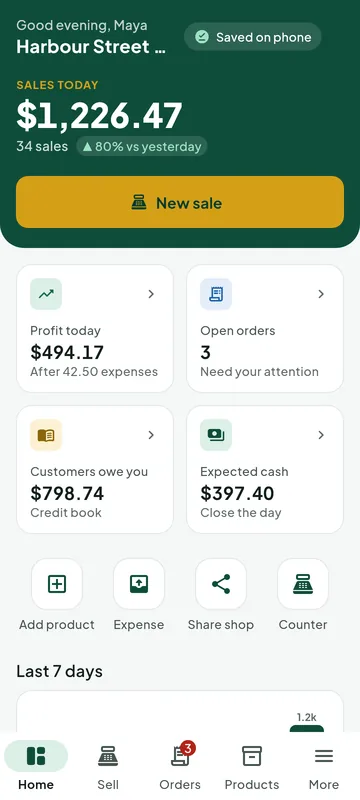
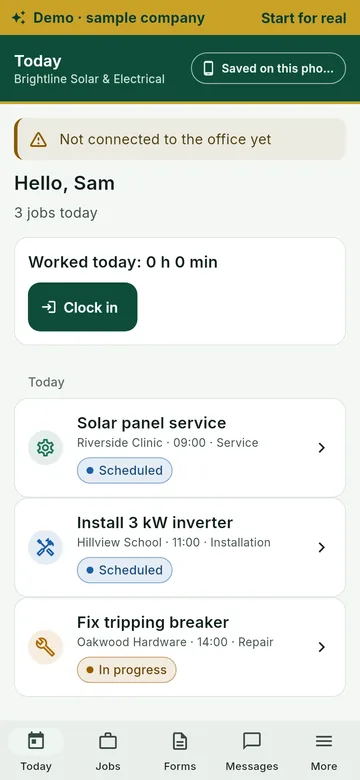
Latest versions
Each file below is the newest build from our team. Tap Download, then follow the install steps.
Decus Go
Download Decus GoPermanent link to the latest version
SHA-25643a6357bc2a8c0e6c7ac7ce88f56ec2a07c6358b0d16bcd4c54be0550fe99282
How to install
- Open the downloaded file on your Android phone or tablet.
- If asked, allow your browser to install apps (Settings › Install unknown apps), then tap Install.
- Open the app and tap Try the demo to explore sample data, or Start for real to begin on the Free plan.
eDecus
Download eDecusPermanent link to the latest version
SHA-25666fea597ec6561fe021e26fda124b937699bcc46e5de752c98b2185e94f2a1c5
How to install
- Open the downloaded file on your Android phone or tablet.
- If asked, allow your browser to install apps (Settings › Install unknown apps), then tap Install.
- Open the app and tap Try the demo to explore sample data, or Start for real to begin on the Free plan.
DecusBooks
Download DecusBooksPermanent link to the latest version
SHA-2566532e7c69f913a99e2aabcec790af7bedce8220fe37b3f224ff97ed199f7aa1b
How to install
- Run the installer you downloaded.
- If Windows SmartScreen says "Windows protected your PC", click More info, then Run anyway. It appears because the installer is new; the SHA-256 below lets you check the file is ours.
- Follow the set-up steps, then open the app from the Start menu.
- On the first screen, choose Try the demo to explore sample data, or Start for real to begin on the Free plan.
Decus Team
Download Decus TeamPermanent link to the latest version
SHA-2565f96f8446be248a819638cc669ee89d69c637936705aec8bbad0f2386a2a7b94
How to install
- Run the installer you downloaded.
- If Windows SmartScreen says "Windows protected your PC", click More info, then Run anyway. It appears because the installer is new; the SHA-256 below lets you check the file is ours.
- Follow the set-up steps, then open the app from the Start menu.
- On the first screen, choose Try the demo to explore sample data, or Start for real to begin on the Free plan.
These are early-access builds. Tell us on WhatsApp if anything looks wrong – we reply quickly.
Try any app in demo mode
Open a Decus app and tap Try the demo. You get a sample business full of realistic data, clearly marked as a demo – no sign-in and no licence needed. The demo never sends anything and stays apart from your real data.
2. Try the demo
Explore sales, invoices, jobs and reports with sample data, in your language and currency.
3. Start for real
One tap clears the demo and opens the normal set-up on the Free plan. Upgrade whenever your business is ready.
Check a download
The SHA-256 fingerprint proves the file is exactly the one we published. Compare it with the value shown above.
Windows
Open Command Prompt in your Downloads folder and run: certutil -hashfile <file name> SHA256
Mac or Linux
Open a terminal and run: shasum -a 256 <file name>
Download questions
Why does Windows show a SmartScreen warning?
SmartScreen warns about new installers that few people have downloaded yet. Click More info, then Run anyway. You can check the SHA-256 fingerprint first.
Why does Android ask about unknown apps?
Apps downloaded outside an app store need your permission once. Allow your browser to install apps, then tap Install.
Do I need an account to try the demo?
No. The demo works without signing in or a licence, and nothing is sent anywhere.
How do I move from the demo to real use?
Tap Start for real. The demo is cleared and the normal set-up opens on the Free plan.
Need a hand installing?
Message us on WhatsApp and we will guide you step by step.
Chat on WhatsApp: +256 789 887684